

Macaly uses AI credits when building and editing websites or web apps. When you need more credits, you can purchase them directly from the Domainhotelli client area.
1. Open the Macaly service information
Log in to the Domainhotelli client area and open your Macaly service. Click “INFORMATION” for the service.

2. Select additional credits
On the service information page, find the “Addons and Extras” section. Select the Macaly AI Credits package you want from the dropdown menu.
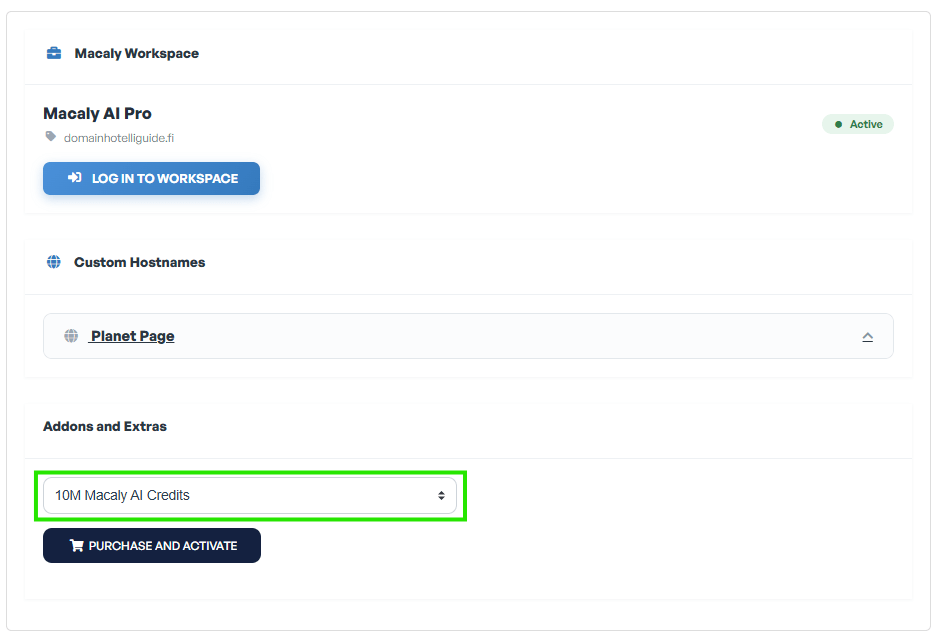
3. Purchase and activate
Once the correct credit package is selected, click “PURCHASE AND ACTIVATE“. The order then continues through the client area checkout flow.
Note
If your client account has more than one Macaly service, make sure you have opened the Information page of the Macaly service that should receive the additional credits.